
Armadillo Protect Instructions
You need a phone, a computer and 5 minutes. This procedure will give Armadillo Protect full access to your system logs and settings.
1. Connect your Android phone to your computer using a high quality USB cable.
2. On your phone, enable USB debugging:
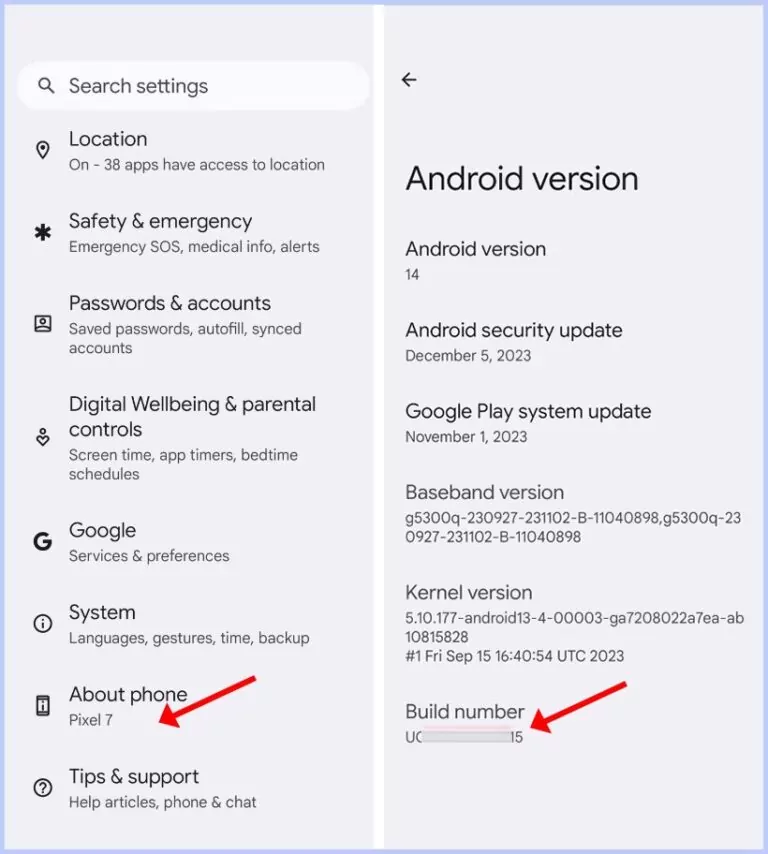
Open "Settings" > "About phone" and tap "Build number" repeatedly until a message appears confirming you're a developer.
Open "Settings" > "System" > "Developer options" and turn "USB debugging" on.
-
3. On your computer, run the ADB commands:
A) Download the activation script then click "Windows_Activate.bat" ( on Windows ) , or "Mac_Activate.command" ( on Mac OS ).
You may need to click 'Allow' on your phone for ADB access. If it doesn't work, switch USB cables and try again.
B) Or... if you don't want to use the activation script, do it yourself instead:
adb shell pm grant com.pacificresearchalliance.protect android.permission.READ_LOGS
adb shell "pm grant com.pacificresearchalliance.protect android.permission.READ_LOGS_FULL 2>/dev/null"
adb shell pm grant com.pacificresearchalliance.protect android.permission.WRITE_SECURE_SETTINGS
adb shell pm grant com.pacificresearchalliance.protect android.permission.DUMP
adb shell pm grant com.pacificresearchalliance.protect android.permission.PACKAGE_USAGE_STATS